
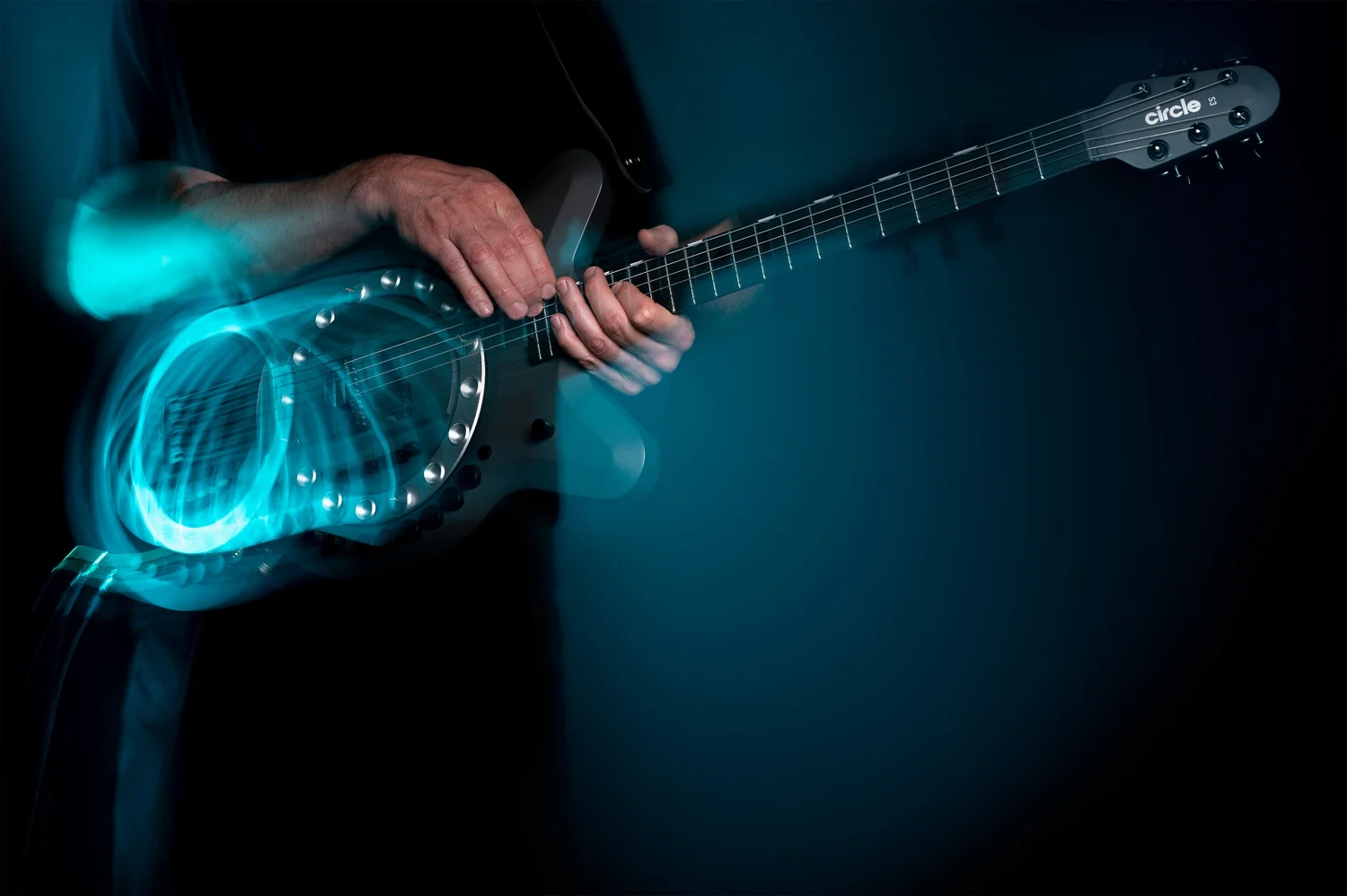
Two modes, four ways to control it.
Player mode
White light
The guitar’s own controls drive the wheel.
Standalone
MIDI mode
Amber light
The wheel follows MIDI from your pedalboard, controller or DAW, and every control sends MIDI to external devices.
Pedalboard
Morningstar MC Pro
MIDI controller
Tested with BeatStep Pro. Others yet to be tested.
DAW
To change modes, hold the encoder down while you switch the guitar on.
For sonic explorers
The hexaphonic pickup makes the six strings six independent voices. From subtle augmentation to complex multichannel sound design, the guitar can behave like a six-part ensemble, shaped by both hands and the precise control of the strumming wheel.
The controls
Player modeMIDI mode
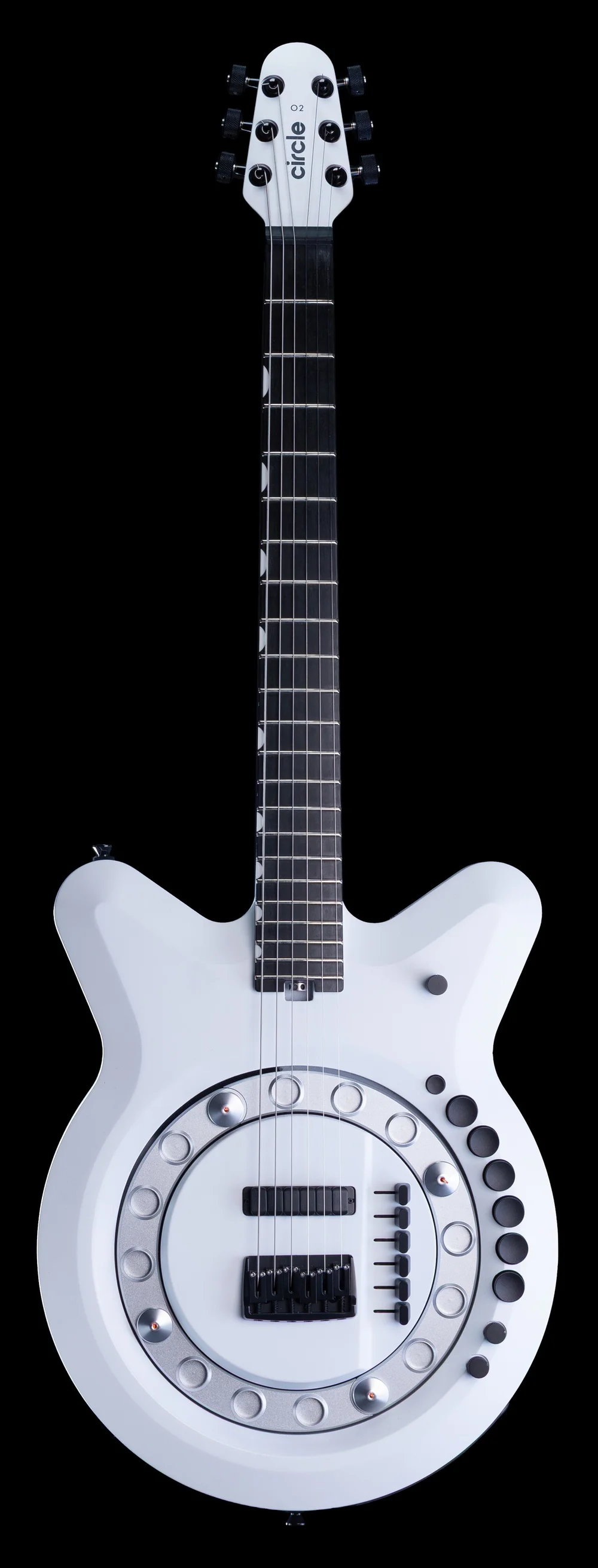
- EncoderPlayer mode: Press: start and stop. Turn: speedMIDI mode: Press: D1 (note 38). Turn: CC3
- Home buttonPlayer mode: One turn to Home, at the last-set speedMIDI mode: Wheel home. C#1, velocity 127
- Button 1Player mode: 1× speedMIDI mode: B2
- Button 2Player mode: 2× speedMIDI mode: A#2
- Button 3Player mode: 3× speedMIDI mode: A2
- Button 4Player mode: 4× speedMIDI mode: G#2
- Button 5Player mode: 5× speedMIDI mode: G2
- Button 6Player mode: 6× speedMIDI mode: F#2
- Pot 1Player mode: CC14, 0–127MIDI mode: CC14, 0–127
- Pot 2Player mode: CC15, 0–127MIDI mode: CC15, 0–127
- Multichannel output
- 6-pin XLR
- ¼-inch output
- On/Off switch
- Volume: String 6, Low E
- Volume: String 5, A
- Volume: String 4, D
- Volume: String 3, G
- Volume: String 2, B
- Volume: String 1, High E
- Home position:Showing a Magpick in wheel position 1
- Wheel position 5
- Wheel position 9
- Wheel position 13
- Indicator light:Amber: MIDI mode.
Blue: MIDI note received.
Green: MIDI clock received.
White: Player mode.
Multichannel output: Connect to the Cycfi Nexus-GK (Cycfi Research product page, opens in a new tab) for individual string output via the multichannel cable. To remove the cable, pinch and pull the collar with five grooves away from the connector.
6-pin XLR: Connect to the Circle Breakout Box for power and MIDI In and Out.
¼-inch output: A summed mono out of all six strings.
Build
- Body
- solid alder
- Neck
- maple, titanium-reinforced, 25.5″ / 650 mm
- Fretboard
- sustainably sourced ebony
- Frets
- Jescar 47104
- Nut
- Graph Tech
- Bridge
- Gotoh FX6
- Machineheads
- Gotoh SGL510Z
- Strings
- D’Addario
- Pickup
- Cycfi Nu Multi 6 hexaphonic
- Outputs
- mono and multichannel out
- Breakout
- Cycfi Nexus-GK (Cycfi Research product page, opens in a new tab), one output per string
- Wheel
- 16 pick positions, removable in two halves with the strings on
- Picks
- 16 magnetic Magpicks with interchangeable soft, medium and hard nylon picks, for different picking strengths
Full control reference
Position control
On startup, the wheel rotates until pick position 1 reaches the Home position.
There are 64 discrete stop positions mapped to 64 MIDI keys, known as Positional Notes.
Pressing a Positional Note spins the wheel. Releasing it stops the wheel, placing your selected note in the Home position.
- Whole positions, 1 to 16, with their notes
- Ticks mark quarter steps
E8 stops the wheel.
Using a single Positional Note will result in at least one full rotation.
To stop in under one full rotation, release and press another note before the wheel passes the new selected position.
Sequencing a series of short notes together can create continuous rotation, strums, swing or intermittent rhythmic bursts.
Every fourth note is a whole position: C3 is 1, E3 is 2, G#3 is 3, and so on to C8, 16.
Full table, every note
| Note no. | Note | Destination |
|---|---|---|
| 60 | C3 | 1 |
| 61 | C#3 | 1.25 |
| 62 | D3 | 1.5 |
| 63 | D#3 | 1.75 |
| 64 | E3 | 2 |
| 65 | F3 | 2.25 |
| 66 | F#3 | 2.5 |
| 67 | G3 | 2.75 |
| 68 | G#3 | 3 |
| 69 | A3 | 3.25 |
| 70 | A#3 | 3.5 |
| 71 | B3 | 3.75 |
| 72 | C4 | 4 |
| 73 | C#4 | 4.25 |
| 74 | D4 | 4.5 |
| 75 | D#4 | 4.75 |
| 76 | E4 | 5 |
| 77 | F4 | 5.25 |
| 78 | F#4 | 5.5 |
| 79 | G4 | 5.75 |
| 80 | G#4 | 6 |
| 81 | A4 | 6.25 |
| 82 | A#4 | 6.5 |
| 83 | B4 | 6.75 |
| 84 | C5 | 7 |
| 85 | C#5 | 7.25 |
| 86 | D5 | 7.5 |
| 87 | D#5 | 7.75 |
| 88 | E5 | 8 |
| 89 | F5 | 8.25 |
| 90 | F#5 | 8.5 |
| 91 | G5 | 8.75 |
| 92 | G#5 | 9 |
| 93 | A5 | 9.25 |
| 94 | A#5 | 9.5 |
| 95 | B5 | 9.75 |
| 96 | C6 | 10 |
| 97 | C#6 | 10.25 |
| 98 | D6 | 10.5 |
| 99 | D#6 | 10.75 |
| 100 | E6 | 11 |
| 101 | F6 | 11.25 |
| 102 | F#6 | 11.5 |
| 103 | G6 | 11.75 |
| 104 | G#6 | 12 |
| 105 | A6 | 12.25 |
| 106 | A#6 | 12.5 |
| 107 | B6 | 12.75 |
| 108 | C7 | 13 |
| 109 | C#7 | 13.25 |
| 110 | D7 | 13.5 |
| 111 | D#7 | 13.75 |
| 112 | E7 | 14 |
| 113 | F7 | 14.25 |
| 114 | F#7 | 14.5 |
| 115 | G7 | 14.75 |
| 116 | G#7 | 15 |
| 117 | A7 | 15.25 |
| 118 | A#7 | 15.5 |
| 119 | B7 | 15.75 |
| 120 | C8 | 16 |
| 121 | C#8 | 16.25 |
| 122 | D8 | 16.5 |
| 123 | D#8 | 16.75 |
| 124 | E8 | STOP |
Speed control
Note velocity governs rotational rate in revolutions per bar (RPB).
In MIDI mode, with the wheel locked to the bar by MIDI clock, revolutions per bar is how many full turns the wheel makes in one bar of music, at the current tempo.
Speed control, played: velocity, the wheel, one bar of MIDI, and the CC74 envelope
16Velocity gives 2RPB
60 RPM
Note held
The maximum rotation speed is 300 RPM, so the available range of RPB is dictated by the BPM.
Drag the end of the note back to shorten it. At note-off the wheel stops at its next home, then starts when the note plays again.
Velocity 1 on a Positional Note switches to CC74 speed control: an envelope drives the wheel’s speed, using the chart’s 2–127 values.
This allows an expression pedal on the Morningstar MC Pro to control the speed, an LFO to create a speed-change loop, or MPE MIDI to draw speed ramps tied to a Positional Note.
Click or tap to add a point, drag to move it, double-click or double-tap to remove it.
BPM governs tempo.
The chart below shows the RPB value corresponding to each MIDI velocity.
Full table, velocity 0 to 127
| Velocity | Function |
|---|---|
| 0 | Does nothing |
| 1 | CC74 SPEED CONTROL |
| 2 | 0.25 RPB |
| 3 | 0.375 RPB |
| 4 | 0.5 RPB |
| 5 | 0.625 RPB |
| 6 | 0.75 RPB |
| 7 | 0.875 RPB |
| 8 | 1 RPB |
| 9 | 1.125 RPB |
| 10 | 1.25 RPB |
| 11 | 1.375 RPB |
| 12 | 1.5 RPB |
| 13 | 1.625 RPB |
| 14 | 1.75 RPB |
| 15 | 1.875 RPB |
| 16 | 2 RPB |
| 17 | 2.125 RPB |
| 18 | 2.25 RPB |
| 19 | 2.375 RPB |
| 20 | 2.5 RPB |
| 21 | 2.625 RPB |
| 22 | 2.75 RPB |
| 23 | 2.875 RPB |
| 24 | 3 RPB |
| 25 | 3.125 RPB |
| 26 | 3.25 RPB |
| 27 | 3.375 RPB |
| 28 | 3.5 RPB |
| 29 | 3.625 RPB |
| 30 | 3.75 RPB |
| 31 | 3.875 RPB |
| 32 | 4 RPB |
| 33 | 4.125 RPB |
| 34 | 4.25 RPB |
| 35 | 4.375 RPB |
| 36 | 4.5 RPB |
| 37 | 4.625 RPB |
| 38 | 4.75 RPB |
| 39 | 4.875 RPB |
| 40 | 5 RPB |
| 41 | 5.125 RPB |
| 42 | 5.25 RPB |
| 43 | 5.375 RPB |
| 44 | 5.5 RPB |
| 45 | 5.625 RPB |
| 46 | 5.75 RPB |
| 47 | 5.875 RPB |
| 48 | 6 RPB |
| 49 | 6.125 RPB |
| 50 | 6.25 RPB |
| 51 | 6.375 RPB |
| 52 | 6.5 RPB |
| 53 | 6.625 RPB |
| 54 | 6.75 RPB |
| 55 | 6.875 RPB |
| 56 | 7 RPB |
| 57 | 7.125 RPB |
| 58 | 7.25 RPB |
| 59 | 7.375 RPB |
| 60 | 7.5 RPB |
| 61 | 7.625 RPB |
| 62 | 7.75 RPB |
| 63 | 7.875 RPB |
| 64 | 8 RPB |
| 65 | 8.125 RPB |
| 66 | 8.25 RPB |
| 67 | 8.375 RPB |
| 68 | 8.5 RPB |
| 69 | 8.625 RPB |
| 70 | 8.75 RPB |
| 71 | 8.875 RPB |
| 72 | 9 RPB |
| 73 | 9.125 RPB |
| 74 | 9.25 RPB |
| 75 | 9.375 RPB |
| 76 | 9.5 RPB |
| 77 | 9.625 RPB |
| 78 | 9.75 RPB |
| 79 | 9.875 RPB |
| 80 | 10 RPB |
| 81 | 10.125 RPB |
| 82 | 10.25 RPB |
| 83 | 10.375 RPB |
| 84 | 10.5 RPB |
| 85 | 10.625 RPB |
| 86 | 10.75 RPB |
| 87 | 10.875 RPB |
| 88 | 11 RPB |
| 89 | 11.125 RPB |
| 90 | 11.25 RPB |
| 91 | 11.375 RPB |
| 92 | 11.5 RPB |
| 93 | 11.625 RPB |
| 94 | 11.75 RPB |
| 95 | 11.875 RPB |
| 96 | 12 RPB |
| 97 | 12.125 RPB |
| 98 | 12.25 RPB |
| 99 | 12.375 RPB |
| 100 | 12.5 RPB |
| 101 | 12.625 RPB |
| 102 | 12.75 RPB |
| 103 | 12.875 RPB |
| 104 | 13 RPB |
| 105 | 13.125 RPB |
| 106 | 13.25 RPB |
| 107 | 13.375 RPB |
| 108 | 13.5 RPB |
| 109 | 13.625 RPB |
| 110 | 13.75 RPB |
| 111 | 13.875 RPB |
| 112 | 14 RPB |
| 113 | 14.125 RPB |
| 114 | 14.25 RPB |
| 115 | 14.375 RPB |
| 116 | 14.5 RPB |
| 117 | 14.625 RPB |
| 118 | 14.75 RPB |
| 119 | 14.875 RPB |
| 120 | 15 RPB |
| 121 | 15.125 RPB |
| 122 | 15.25 RPB |
| 123 | 15.375 RPB |
| 124 | 15.5 RPB |
| 125 | 15.625 RPB |
| 126 | 15.75 RPB |
| 127 | 15.875 RPB |
Each control, by mode
| Control | Player mode | MIDI mode |
|---|---|---|
| Indicator light | White | Amber |
| MIDI mappable | Pots 1 and 2 only | Every control |
| Encoder press | Starts and stops the wheel in a continuous spin | Sends MIDI Out D1 (note 38) |
| Encoder turn | Sets the speed. The default is 4×, the same as button 4 | Sends CC3, range 0–127 |
| Home button | Each tap turns the wheel once at the last-set speed and stops pick position 1 at the Home position. Tap again while it turns to keep it turning; taps don’t add up. Press the encoder to return to a continuous spin. | Sends the wheel back to the Home position. Sends MIDI Out C#1, velocity 127. |
| Button 1 | 1× speed | MIDI Out B2 |
| Button 2 | 2× speed | MIDI Out A#2 |
| Button 3 | 3× speed | MIDI Out A2 |
| Button 4 | 4× speed | MIDI Out G#2 |
| Button 5 | 5× speed | MIDI Out G2 |
| Button 6 | 6× speed | MIDI Out F#2 |
| Pot 1 | MIDI Out CC14, range 0–127 | MIDI Out CC14, range 0–127 |
| Pot 2 | MIDI Out CC15, range 0–127 | MIDI Out CC15, range 0–127 |
Player mode
| Indicator light | White |
|---|---|
| MIDI mappable | Pots 1 and 2 only |
| Encoder press | Starts and stops the wheel in a continuous spin |
| Encoder turn | Sets the speed. The default is 4×, the same as button 4 |
| Home button | Each tap turns the wheel once at the last-set speed and stops pick position 1 at the Home position. Tap again while it turns to keep it turning; taps don’t add up. Press the encoder to return to a continuous spin. |
| Button 1 | 1× speed |
| Button 2 | 2× speed |
| Button 3 | 3× speed |
| Button 4 | 4× speed |
| Button 5 | 5× speed |
| Button 6 | 6× speed |
| Pot 1 | MIDI Out CC14, range 0–127 |
| Pot 2 | MIDI Out CC15, range 0–127 |
MIDI mode
| Indicator light | Amber |
|---|---|
| MIDI mappable | Every control |
| Encoder press | Sends MIDI Out D1 (note 38) |
| Encoder turn | Sends CC3, range 0–127 |
| Home button | Sends the wheel back to the Home position. Sends MIDI Out C#1, velocity 127. |
| Button 1 | MIDI Out B2 |
| Button 2 | MIDI Out A#2 |
| Button 3 | MIDI Out A2 |
| Button 4 | MIDI Out G#2 |
| Button 5 | MIDI Out G2 |
| Button 6 | MIDI Out F#2 |
| Pot 1 | MIDI Out CC14, range 0–127 |
| Pot 2 | MIDI Out CC15, range 0–127 |
The light also shows blue when a MIDI note is received and green when MIDI clock is received.
Defaults
- MIDI In
- Channel 2
- MIDI Out
- Channel 1
- Full wheel control
- MPE MIDI set to Multi-Channel, with First and Last Note Channels set to Channel 2